
 TSplus Remote Support
Remote desktop support for your teams and clients
Access. Support. Control.
Provide instant attended or unattended remote assistance, anywhere, at any time. From Windows, macOS, Android or iOS, in the cloud or on your own servers.
- From $8/month
- Windows, macOS, Android & iOS
- Cloud or self-hosted
15-day free trial · all features included · no credit card
Trusted by over 500,000 companies

4.8 out of 5 on G2

4.7 out of 5 on Trustpilot

4.9 out of 5 on Google

4.8 out of 5 on SourceForge
Features
Remote support that does the job, without the price tag
TSplus Remote Support is an intuitive remote desktop tool for IT teams, MSPs and help desks: instant, secure and affordable attended or unattended assistance for your clients and employees.
New in version 4
What’s new in TSplus Remote Support
Highlights from versions 4.2 to 4.4 (2025–2026). Read the full changelog.

iPhone and iPad app
Take control of Windows and Mac computers from iOS, with touch and trackpad modes, a floating toolbar and chat.

Sign in with Google, Apple, Microsoft or GitHub
Agents and admins sign in to the client and the web console with the account they already use.

Signed webhooks
Send session events to your ticketing, CRM or SIEM tools. Freshdesk is also built in.

Any Windows RDP session
On a server, pick the active RDP or console session you want to join with unattended access.

True 4K, up to 30 fps
Smoother image, monitor selection and adaptive quality when the network fluctuates.

FIPS-compatible
Runs on Windows machines with FIPS mode enabled, for regulated environments.
Remote control
Unattended access to unlimited computers
Set up secure, permanent access to as many remote computers as you need, even in low-power mode with Wake-on-LAN.

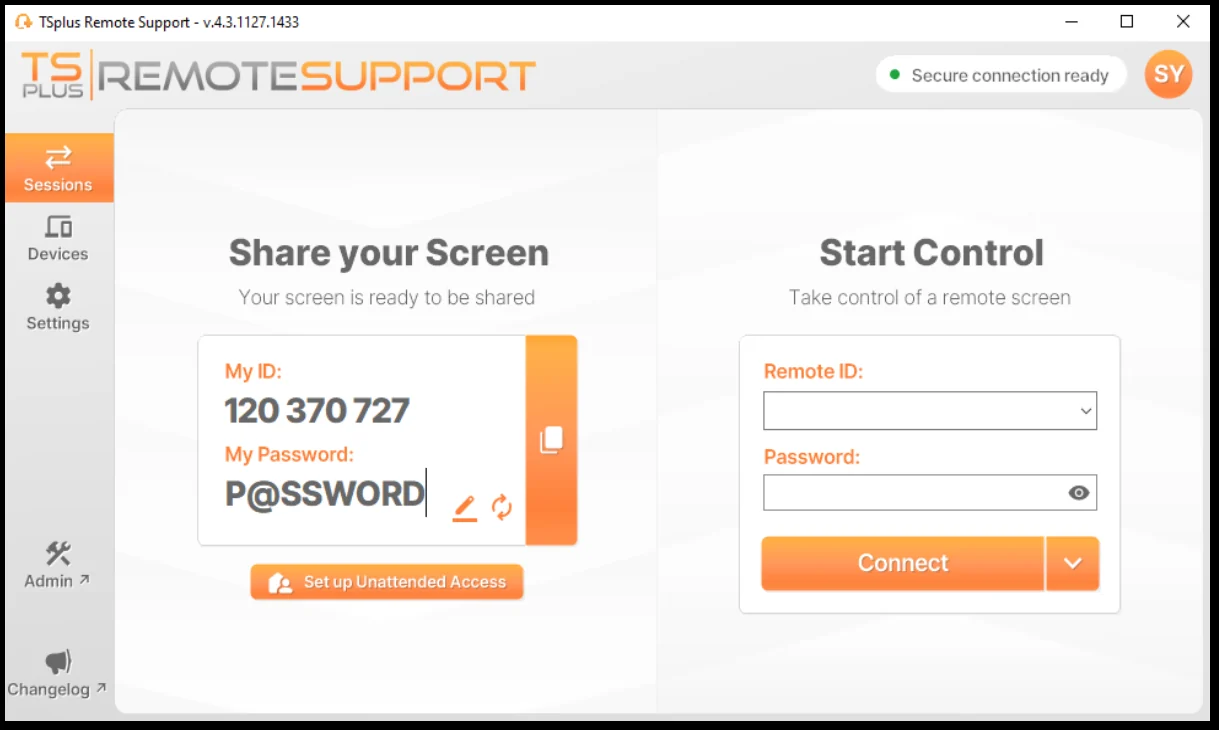


Save and organize computers
Add remote computers with a custom name, save their access credentials, and organize them in searchable folders.

One-click connections
Open a session with a single click on Connect, without typing an ID or a password again.

Secure, flexible setup
Unattended passwords, command-line setup, and access restricted to members of your subscription.
Security
Security built into every session
Every session is encrypted, every account can be protected by two-factor authentication, and you decide where your data lives.

End-to-end TLS encryption
Screen, commands and files travel over modern TLS between the agent and the end user.

Two-factor authentication
Time-based one-time codes from Google Authenticator, Microsoft Authenticator or Authy.

Worldwide relay network
Relays in 12 locations worldwide, run by TSplus. Each client uses the nearest one, with live status online.

Cloud or on-premises
Use our relays, or host the whole infrastructure yourself to keep every session log in-house.
Customer spotlight
Success stories
How companies of every size run their remote support with TSplus.

InfoCloud
Centralising and streamlining a support and assistance infrastructure while maintaining compliance and security.

Doctors Hospital
Remote assistance and remote maintenance for healthcare staff in a critical environment.

NBS Informatica
Large-scale remote assistance across Brazil and South America, including unattended access.
Tutorials
TSplus Remote Support guides
Short tutorials to master the key features.
Customer feedback
Trusted by thousands worldwide

Support for SME clients
“TSplus delivers on its promise. I’ve relied on it for several years to support SME clients across the South of England.”
★★★★★

User-friendly and flexible
“A scalable solution packed with additional features available as add-ons. The support team ensures a smooth transition from your previous solution, making the process hassle-free. They’re great to work with!”
★★★★★

Great value for money
“This program has been perfect for us over the past 5+ years, providing everything we need to support our customers effectively. It offers the same robust functionalities as competitors but at a much more affordable price.”
★★★★★
“TSplus Remote Support is a great tool and helped us grow our customer accounts. Remote Support also provides a personalized support experience and great speed.”
Anil Pujari, CISO & Technical HeadInfoCloud Global
★★★★★
FAQ
Frequently asked questions
Is there a free trial?
Yes. Every feature is included in a 15-day free trial, with no credit card required. Download TSplus Remote Support to start it.
Can I connect to and from a Mac?
Yes. The macOS client (macOS 12.3 Monterey or later) can both take control of a computer and share its own screen. Get it on the download page.
Can I support users from my phone or tablet?
Yes. Agents can take control of Windows and Mac computers from Android (6.0 or later) and, since 2026, from iPhone and iPad (iOS 13 or later). Android devices can also share their own screen.
Can I host TSplus Remote Support on my own servers?
Yes. The relay and the API run as Docker containers on Ubuntu 24.04 LTS. Self-hosting starts at 50 concurrent connections: see the Self-Hosted Solution.
Is this a one-time payment or a subscription?
TSplus Remote Support is a yearly subscription that renews automatically. You can cancel at any time and keep your access until the end of the billing period.
Can I get help to deploy it?
Yes. Start with the user guide; if you get stuck, our support team will help you.
How do I get certified on TSplus Remote Support?
Complete the Remote Support training course on the TSplus Academy.
My clients are interested in TSplus Remote Support. Can I become a partner?
Yes. We work with over 5,000 partners worldwide. Contact our sales team to apply.
Still have questions? Contact us
Ready to dive in? Start your free trial today.
Try TSplus Remote Support free for 15 days. All features included, no credit card required.